Month-end close, without the chaos.
Plan, track and complete your month-end close in one place. Give your finance team clear ownership, working-day deadlines, dependencies and real-time visibility — without chasing spreadsheets and status updates.
Built specifically for finance teams. No credit card required.
Still managing month-end in Excel?
Spreadsheets are great for calculations. They weren’t designed to coordinate an entire finance team’s close.
Traditional month-end
- Static calendar deadlines
- Multiple spreadsheet versions
- Manually chase task owners
- Dependencies held in people’s heads
- Status meetings to understand progress
- Copy last month’s checklist and start again
Close Loop
- Working-day deadlines
- One source of truth
- Live task progress
- Visible task dependencies
- Real-time close visibility
- Automatically repeat your close process
Your close doesn’t run on calendar dates.
Finance teams think in working days. Close Loop does too.
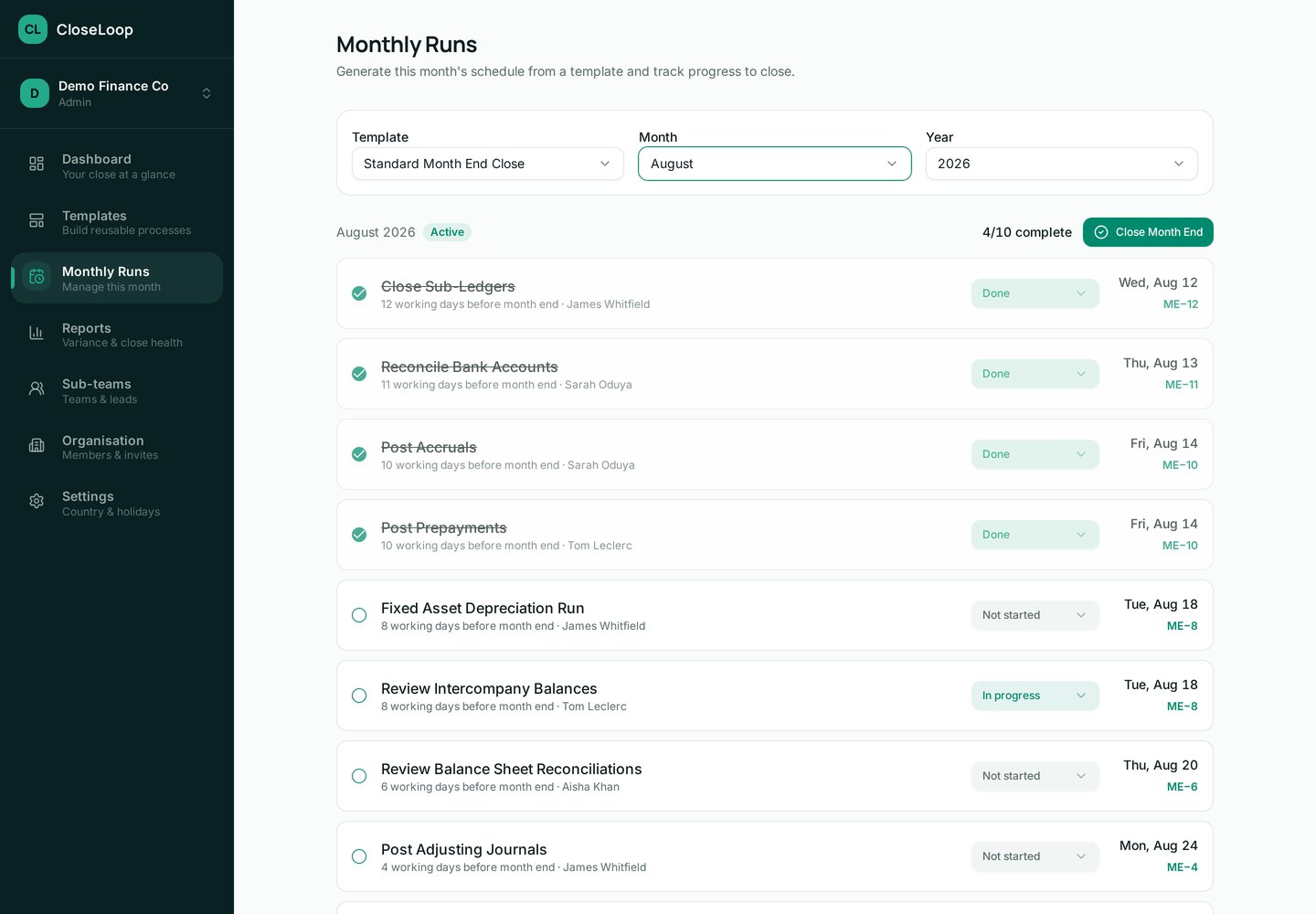
Set every task against month end in working days — ME−3, ME+1, ME+3, ME+5 — and Close Loop calculates the real date for each close period. Weekends are skipped automatically, and bank holidays for your country can be imported or added manually in Settings, so deadlines land on days your team actually works.
- Deadlines defined once, recalculated for every month
- Weekends and bank holidays excluded from the count
- Tasks listed in due-date order for the current close
Month End
ME+3 means three working days after month end — Close Loop resolves the exact date each month.
When Accruals slips, everything downstream stays blocked — and Close Loop shows it, instead of letting it surface in a status meeting.
See what’s holding up the close.
Month-end tasks don’t happen in isolation. Close Loop makes dependencies visible so your team knows what can start, what’s blocked and what needs attention.
- Link a task to as many prerequisite tasks as it needs
- A task can’t be marked done until its prerequisites are complete
- Blocked tasks are grouped on the dashboard so nothing hides
- Owners are notified by email when their task becomes unblocked
Know where your close stands. Without another status meeting.
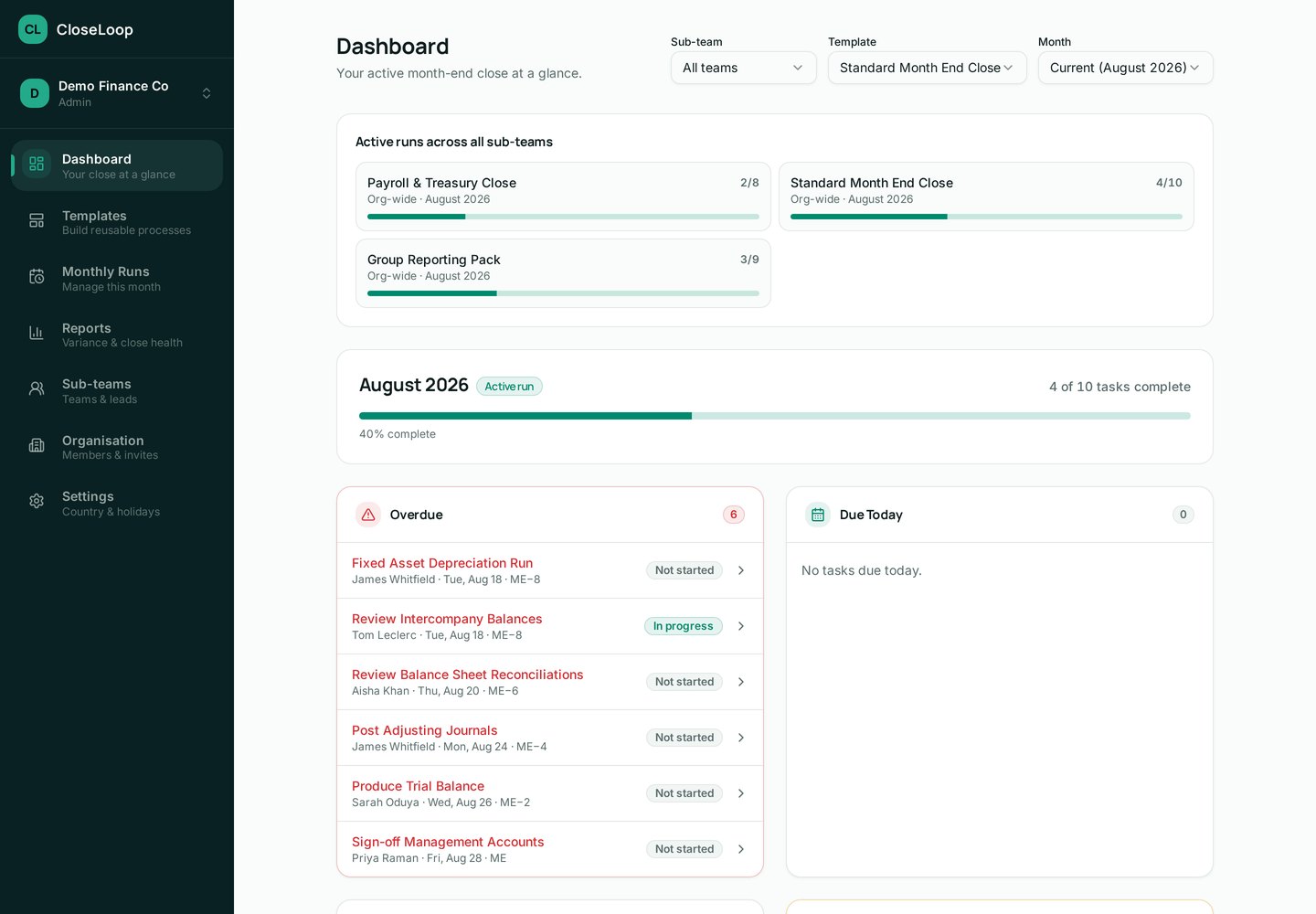
See progress across your finance team in real time and identify overdue work before it becomes a month-end problem.
Overall close completion
A single percentage for the active close, updated as tasks are completed.
Completed & in-progress tasks
Every task carries a status of Not started, In progress or Done.
Overdue and due today
Late and imminent work is grouped so it can be dealt with immediately.
Blocked work
Tasks waiting on prerequisites are listed with what they’re waiting for.
Sub-team progress
Filter the close by sub-team to see how each part of finance is tracking.
Ownership
Each task is assigned to a real team member, so accountability is clear.
Build your close once. Run it every month.
Build your close
Create your month-end process, tasks, owners, deadlines and dependencies.
Run month-end
Your team works from one shared close plan with clear responsibilities and live progress.
Repeat
Roll the process forward for the next close rather than rebuilding another spreadsheet.
Everything your close needs
Purpose-built for the financial close — not adapted from generic task management.
Working-day deadlines
Deadlines that understand ME−3, ME+1, ME+3 and ME+5, with weekends and bank holidays skipped.
Dependencies
Connect tasks so everyone knows what’s blocked and what’s ready to start.
Teams & sub-teams
Organise responsibilities across your finance function, with admins, team leads and members.
Live close progress
See exactly where month-end stands — complete, in progress, overdue or blocked.
Variance reporting
Review closed months against plan, track a Process Health Score over time and export a PDF.
Recurring close process
Build your process once as a template and generate next month’s close from it.
Built by finance, for finance.
Close Loop was created from first-hand experience managing month-end close — working-day deadlines, spreadsheets, dependencies, changing priorities and endless status chasing.
The goal is simple: give finance teams one place to run month-end properly.
Simple pricing
You’re not buying another task manager — you’re replacing the spreadsheets, chaser messages and status meetings that surround your close. Start free; final pricing is coming soon.
Pro
For growing finance teams that need structure and visibility.
- Unlimited close templates & monthly runs
- Up to 25 organisation members
- Working-day deadlines with bank holiday support
- Dependency tracking & blocked-task visibility
- Email notifications & daily close summaries
Business
For larger teams that need reporting, sub-teams and advanced controls.
- Everything in Pro
- Unlimited organisation members
- Sub-teams, team leads & team-based filtering
- Variance report & Process Health Score
- PDF export & priority support
No credit card required to get started.
Frequently asked questions
Your close data belongs to your organisation. Members only ever see the organisations and sub-teams they have been added to, and invitations are controlled by your admins.
Ready for a calmer month-end?
Move your close out of spreadsheets and give your finance team one place to plan, track and complete month-end.